Coloring for Kids: Drawing 2-6
- 4.1
- Rating
- 1.00M
- Installs
- Free
- Price
 Analysis by App-foxy
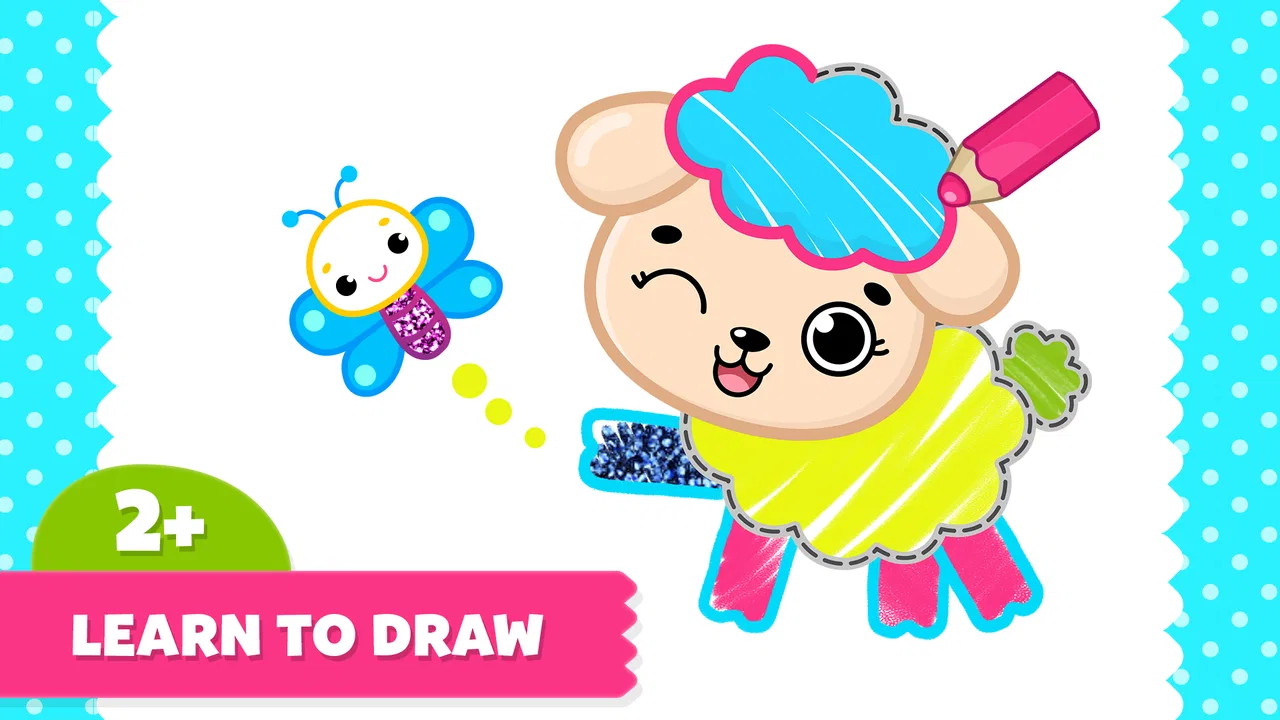
Drawing Games for Kids is the kind of educational game that can win over a young child quickly: open a page, choose colors, and start making marks without needing to read complicated instructions. I found its strongest appeal in that immediate, low-pressure interaction. It feels more like a digital coloring table than a traditional game, which makes it approachable for toddlers and preschoolers who are still learning how to control a touchscreen.
The app comes from Bimi Boo Kids Learning Games for Toddlers FZ-LLC and is designed for Everyone. It is free to install, with optional purchases ranging from $5.99 to $39.99 per item. That combination makes it easy for a parent to try before deciding whether the larger collection deserves a place on a child’s device. My main question after the first few sessions was not whether a child would enjoy it, but whether the novelty would last once the first colorful pages had been explored.
What the first week feels like
During the first week, the experience is especially easy to understand. A child does not have to master rules, compete against a timer, or follow a long lesson. The central activity is drawing and coloring, so the app works well when the goal is quiet creative play rather than intense stimulation. That simplicity is a real strength for younger children, particularly during a short wait at a restaurant, a calm period before bedtime, or a few minutes while an adult finishes a practical task.
You May Also Like

 Pandora - Music & Podcasts
Pandora’s Music Is Easy to Start, but Harder to Recover
Pandora’s strength is its low-effort path from a seed to a station. Its weak spot is how much confidence it asks you to place in connection, setup, and quiet recovery.

 8 Ball Pool
 Is Built on Rivalries, Rematches, and Routine
A close look at the rivalries, rematches, shared routines, and unanswered safety questions that turn a quick pool match into a persistent mobile community.

 Samsung Music
’s Quiet Strength Is Playing What You Already Own
Its reach comes less from spectacle than from dependable access to a personal library. That simplicity is both the app’s strongest retention engine and its ceiling.

 AccuWeather: Weather Radar
AccuWeather Review: A Quick, Clear Forecast for Everyday Decisions
For everyday plans, the best forecast is the one you can understand quickly. AccuWeather makes rain timing, radar, and local conditions easy to act on, with a few trade-offs.

 Hill Climb Racing
Why Hill Climb Racing Still Turns Crashes Into One More Run
A tiny car, a bumpy hill and one more upgrade: Hill Climb Racing keeps resurfacing because its simple chaos makes every near-miss feel personal.

 AliExpress - Shopping App
AliExpress Makes Global Shopping Feel Personal, but Shoppers Bear the Risk
AliExpress turns a global marketplace into a pocket-sized discovery engine. Its reach is useful, its shopping loop compelling, and its trade-offs easy to miss.
More From Our News Desk
View All News


The collection is presented as a coloring book with more than 200 pages, giving the opening experience plenty of variety. A child who enjoys animals may find one page more appealing than another child who prefers vehicles, characters, or simple shapes. This matters because the first session can otherwise become repetitive very quickly. Having many pages to browse gives parents a better chance of finding a theme that matches the child’s current interest.
I would still introduce it with an adult nearby. Young children can understand the drawing activity without help, but they may need assistance choosing a page, changing colors, or deciding what to do after finishing a picture. That first guided session also lets a parent see whether the controls feel comfortable for the child’s age and hand coordination. A toddler who is still developing precise finger movement may enjoy broad strokes more than detailed coloring areas.
One useful approach is to treat the first week as a creative routine rather than a reward that appears only when the child is bored. I would offer a short drawing period and then ask the child to describe the picture or choose a favorite color. This turns the app into a conversation starter instead of a silent screen activity. It also helps reveal whether the child is genuinely interested in drawing or simply tapping through pages because the colors are attractive.
The game’s educational value is modest but meaningful. It can support color recognition, hand-eye coordination, and basic digital confidence. I would not use it as a replacement for paper, crayons, or hands-on art. Touchscreen drawing gives a different kind of feedback, and the absence of physical materials means a child misses the texture, resistance, and mess that are part of real coloring. Its best role is as an additional creative option, especially when paper is inconvenient.
The free starting point is helpful for testing that fit. A parent can see whether the child understands the activity and returns to it willingly before spending money. The presence of in-app purchases also means I would check the purchase area myself before handing over the device. A child-friendly game can still create an awkward moment if a small user reaches a locked page and repeatedly asks to unlock it.
Its current version is 1.43, and it runs on Android 7.0 or later. That makes the technical entry requirement fairly accessible for older Android devices, although the actual comfort of use will depend on the phone or tablet’s screen size and responsiveness. A larger tablet is much better for small fingers than a compact phone. On a phone, the activity can work for a quick distraction, but the drawing area may feel cramped during more detailed pages.
Why the simple design works for young children
Many children’s games try to teach through several systems at once: puzzles, rewards, storytelling, and mini-games. This one benefits from doing less. A child can focus on the act of choosing and applying colors without having to remember a complicated sequence. For a preschooler who becomes frustrated by failure screens, that gentler structure may be more inviting than a conventional learning game with right and wrong answers.
That simplicity also helps in mixed-age families. An older sibling may find the activity too basic, while a younger child can use it comfortably. I see it as most suitable for toddlers and early preschoolers who are beginning to explore creative apps, not for children looking for advanced illustration tools or a structured academic curriculum.
A practical tip is to choose a small group of pages in advance instead of letting a child scroll endlessly. Browsing can become the main activity, particularly when there are many choices. Selecting three or four pages creates a clearer session: color one picture, talk about it, then choose whether to continue. This reduces aimless tapping and makes the app easier to fit into a family routine.
Whether it keeps its value after the novelty fades
After the first month, the question changes. A large page collection sounds generous at the beginning, but lasting value depends on whether the child returns to the activity with a different purpose each time. In my view, the app has recurring value when adults use it as an invitation to create, not when they expect the screen alone to hold attention indefinitely.
One way to extend its life is to connect pages with everyday topics. After a visit to a park, a child could color a nature-themed picture and talk about what they saw. Before a trip, a parent could offer a page related to transport or places. This kind of connection makes familiar coloring pages feel less repetitive because the conversation around them changes. The app becomes a small part of a broader activity rather than a closed loop.
Another useful workflow is to let the child revisit a favorite page with a new color plan. Instead of treating a completed picture as finished forever, I would ask questions such as, “What would this look like at night?” or “Can we make a silly version?” That encourages experimentation and gives a familiar page a second life. It also shifts the focus away from filling every area perfectly, which is important for children who may become discouraged by precision.
The app is more likely to remain useful for families who value short, repeatable creative sessions. It is less convincing for parents seeking measurable progression from one lesson to the next. Coloring naturally offers open-ended practice, but it does not necessarily provide the clear advancement that a phonics game, number game, or puzzle curriculum might offer. If your priority is early academic instruction, another educational app may be a better main tool, with this one serving as a relaxed supplement.
The average rating is 4.1 from around 9.3 thousand ratings, and the game has passed one million installs. Those figures suggest that the basic concept has broad appeal, but they should not decide the purchase for your family. A child’s response to drawing apps varies widely. Some children return to the same image repeatedly; others want animation, sound, or a stronger sense of achievement. I would judge it by the child’s behavior after several sessions, not by the size of its audience.
There is also a useful distinction between recurring value and endless content. More pages can delay boredom, but they do not automatically create deeper engagement. The app’s long-term strength comes from the flexibility of coloring: a child can use the same activity for free expression, quiet concentration, storytelling, or simple color practice. Its weakness is that the underlying interaction remains familiar, so children who need constant novelty may move on quickly.
How it compares with paper, video, and structured learning games
Compared with paper coloring books, this game is cleaner and easier to carry. There is no need for a pencil case, a table, or a place to store finished pages. That convenience is valuable during travel or waiting rooms. Paper is still better when a child needs sensory exploration, wants to draw outside the boundaries, or should take a break from screens. I would alternate between both rather than choosing one permanently.
Compared with passive video, the app asks the child to make decisions and perform an action. That makes it a more engaged option for a short screen session. However, it may be less immediately captivating than a fast-moving cartoon. If a child is already tired, they may prefer watching rather than creating. In that situation, I would not force the app to become an educational obligation; creative play works best when the child has enough energy to participate.
Compared with structured educational games, Drawing Games for Kids offers less explicit teaching and more freedom. A literacy or mathematics game may be preferable when a parent wants targeted practice and visible progression. This coloring game is better when the goal is to slow down, practice control, or give a child a harmless creative outlet. The two categories serve different needs, and confusing them can lead to disappointment.
What parents need to maintain
The maintenance burden is fairly small, but it is not zero. The biggest task is managing access to the available pages and purchases. Because the game is free to start and includes optional paid items, I would establish a simple rule before the child plays: free pages are available, while anything that asks for a purchase requires an adult. That conversation is easier before a locked item appears on screen.
Parents should also manage the device rather than relying on the game to create healthy boundaries by itself. A short timer, a clear stopping point, or a routine such as “one picture before snack” works better than allowing sessions to expand until the child becomes irritable. Coloring can feel calm, but it is still screen time. The app fits best when it has a defined place in the day.
Storage and organization are another practical consideration. If a child creates many pictures, I would occasionally review what they want to keep and what can be cleared or replaced, if the device offers that option. This turns finished drawings into a small record of changing interests. It also prevents the child from feeling that every session must produce something permanent.
Adult involvement can be light, but occasional involvement improves the experience. Asking a child to name colors, invent a story, or explain a choice adds value without turning play into a lesson. The important balance is not to correct every stroke. The game should remain a place where the child can make unusual choices without hearing that a picture is “wrong.”
Where fatigue begins
The main source of fatigue is the repeated nature of coloring. Even with a broad selection of pages, the basic action does not change dramatically. A child who expects new mechanics, characters, or challenges may lose interest once the initial discovery period ends. That is not a flaw in the concept, but it does limit how often I would present it as the only available activity.
Another possible frustration is the difference between a child’s creative intention and the precision of touch controls. Small fingers can slide outside a desired area, and a child may not care about staying neatly inside a shape. Adults should resist turning the experience into a test of accuracy. If the child becomes upset by mistakes, I would choose simpler pages or move to paper, where the rules of the activity are more flexible.
The purchase structure can also interrupt the feeling of free exploration. A child may browse confidently and then encounter content that requires an adult decision. That moment is manageable, but it makes the game less seamless than a completely open coloring book. I would preview the available choices and explain the boundary in plain language rather than promising access to everything.
There is a further trade-off between convenience and originality. Digital coloring can be instantly reset and repeated, but that also means the child may rush through pages without developing patience. To counter that habit, I would occasionally ask the child to spend time on one picture and describe what is happening in it. This encourages observation and storytelling, two benefits that are easy to miss when the activity becomes rapid tapping.
Children who are sensitive to visual stimulation may also need shorter sessions. Bright colors and a large selection can be exciting, but too much choice can make it difficult to settle. Narrowing the options before handing over the device is a simple improvement. The goal is not to extract maximum content from the game; it is to make the available content feel manageable.
Who should choose it and who should skip it
I would recommend this game to parents of toddlers and young preschoolers who want a gentle drawing activity that works in small time windows. It is particularly suitable for families that travel, for children beginning to use a tablet, and for adults who want a creative alternative to passive video. The free entry point makes the decision easier, while the large collection gives interested children room to explore.
I would be more cautious if your child dislikes coloring, needs strong rewards to stay engaged, or is ready for detailed drawing tools. I would also skip it as a primary choice if your main goal is reading, counting, spelling, or another specific academic skill. Its educational character comes from creative practice and basic interaction, not from a formal sequence of lessons.
For families trying to reduce screen dependence, this is not a magic solution. It may be calmer than some games, but it still works best as one option among books, outdoor play, music, blocks, and physical art materials. The app earns its place when it solves a real practical problem, such as providing a portable creative activity, rather than when it is used simply because it is available.
My long-term verdict
After the novelty fades, Drawing Games for Kids can keep a modest but useful place in a child’s routine. Its lasting value comes from flexibility, not complexity. A child can use it for a quick coloring session, a conversation about colors, a travel distraction, or a story-building prompt. Those uses are enough to make it worthwhile for the right age group, especially when an adult occasionally refreshes the context.
I do not see it as an app that will hold every child’s attention for months without support. The interaction can become repetitive, the purchase prompts require sensible boundaries, and paper remains the better choice for tactile creativity. Still, those limitations are clear and manageable. The game does not need to replace traditional art or structured learning to be useful.
My recommendation is to try the free version with a defined routine, a larger screen when possible, and an adult purchase rule. If the child returns to pages voluntarily and enjoys talking about the pictures, the optional content may offer enough additional variety to justify consideration. If interest disappears after the first few sessions, there is little reason to keep pushing it; another kind of creative or educational activity will probably serve that child better.
In short, this is a practical digital coloring book rather than a deep game. I would keep it available for quiet moments and travel, but I would not make it the center of a child’s learning plan. Its best quality is that it makes creative play easy to begin, and its main weakness is that the same simplicity can eventually limit engagement.
FAQs for Coloring for Kids: Drawing 2-6
01What age range is Drawing Games for Kids suitable for?
Drawing Games for Kids is designed for children aged 3 to 8 years old. The app features intuitive controls and vibrant graphics that cater to young users, ensuring an engaging and educational experience. Parental guidance is recommended to maximize the learning potential and ensure safe use.
02Does Drawing Games for Kids require an internet connection to function?
No, Drawing Games for Kids can be enjoyed offline. Once downloaded, the app allows children to access its full array of drawing tools and activities without needing an internet connection, making it ideal for travel or areas with limited connectivity.
03Are there any in-app purchases in Drawing Games for Kids?
Yes, Drawing Games for Kids offers in-app purchases. These may include additional drawing tools, templates, or themed content packs. Parents can control purchases with password-protected settings or parental controls to prevent unintended spending by children.
04How does Drawing Games for Kids support a child's development?
Drawing Games for Kids encourages creativity and fine motor skills through interactive drawing activities. The app includes educational elements such as color recognition, shape identification, and imaginative play, making it a fun way for children to develop essential cognitive skills while expressing themselves artistically.
05Is Drawing Games for Kids safe for my child to use?
Yes, Drawing Games for Kids is designed with child safety in mind. It features a user-friendly interface without external ads, ensuring a distraction-free experience. Parents are encouraged to oversee use, especially if there are in-app purchases available, to maintain a safe digital environment.
Pros
- Encourages creativity and imagination.
- User-friendly interface for young children.
- Wide variety of tools and colors.
- No ads for distraction-free play.
- Offline mode available for travel.
Cons
- Limited advanced features for older kids.
- In-app purchases can add up quickly.
- Some tools might be too basic.
- Occasional app freezes reported.
- Lacks detailed tutorials for beginners.

Coloring for Kids: Drawing 2-6
Gallery